Phillippine Society of Information Technology Educators Foundation, Inc.
Region XII Chapter
IT Reseach and Digital Image Analysis Seminar
January 14-16, 2010, Notre Dame of Kidapawan College
Vladimir Y. Mariano, Ph. D.
Institute of Computer Science
University of the Philippines
Los Baños
Email: vymariano@uplb.edu.ph
Research Areas: Digital Image Processing, Computer Vision, Pattern Recognition
Thursday, January 14, 2010


Friday, January 8, 2010
CSE 122 / IT 122 Study and Debug the vb game program (MIDTERM)
These are the objects: 2 shapes(circle and rectangle), 1 timer(interval=500), 1 label (caption=Score:), 1 command button (caption=&Reset)
Note: Use a prefixes in naming of each objects/controls.
controls that has a code: form_load, form_mousemove,timer,command button
Dim v As Integer, Y As Integer, score As Integer
Private Sub Form_Load()
ball.Left = 2500
ball.Top = 1300
X = -50
Y = -50
End Sub
Private Sub Form_MouseMove(Button As Integer, Shift As Integer, X As Single, Y As Single)
pad.Left = X - pad.Width / 2
End Sub
Private Sub reset_Click()
ball.Left = 2500
ball.Top = 1300
X = -50
Y = -50
reset..Visible = False
score = 0 ' reset the score
scorecard.Caption = "score:" & score ' show the score on our label
Me.Caption = "score:" & score
Timer1.Enabled = True ' start the timer again to get the ball moving
End Sub
Private Sub Time1_Timer()
ball.Move ball.Left + X, ball.Top + Y
If balll.Top <= 0 Then Y = Y * -1 End If If ball.Left <= 0 Then X = X * -1 End If If ball.Left + ball.Width >= Me.ScaleWidth Then
X = X * -1
End If
If ball.Top + ball.Height >= pad.Top Then
If (ball.Left + ball.Width < pad.Left) Or (ball.Left > pad.Left + pad.Width) Then
'if the ball is to the left or right of the pad then
Me.Caption = "game over" ' set the forms captions to read game over
reset.Visible = True 'make the reset button visible
Timer.Enabled = False ' pause the program
Else
Y = Y * -1.05 'speed up the ball
X = X * 1.05 '
score = score + 1 'add 1 more hit to the score
scorecard.Caption = "score:" & score 'show the score on our label
Me.Caption = "score:" & score ' show the score as our forms caption
If (ball.Left + ball.Width / 2) < (pad.Left + pad.Width / 2) Then 'if the ball is to the left or the pad center then If X > 0 Then ' if it is going to the right
X = X * -1 'make it go left
End If
Else ' the ball must be on the right of the pad
If X < 0 Then 'if it is going left
X = X * -1 'make it go right
End If
End If
End If
End If
endif
End Sub
Design View

Output View
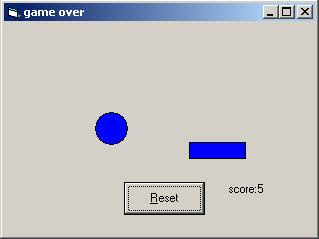
Note: Use a prefixes in naming of each objects/controls.
controls that has a code: form_load, form_mousemove,timer,command button
Dim v As Integer, Y As Integer, score As Integer
Private Sub Form_Load()
ball.Left = 2500
ball.Top = 1300
X = -50
Y = -50
End Sub
Private Sub Form_MouseMove(Button As Integer, Shift As Integer, X As Single, Y As Single)
pad.Left = X - pad.Width / 2
End Sub
Private Sub reset_Click()
ball.Left = 2500
ball.Top = 1300
X = -50
Y = -50
reset..Visible = False
score = 0 ' reset the score
scorecard.Caption = "score:" & score ' show the score on our label
Me.Caption = "score:" & score
Timer1.Enabled = True ' start the timer again to get the ball moving
End Sub
Private Sub Time1_Timer()
ball.Move ball.Left + X, ball.Top + Y
If balll.Top <= 0 Then Y = Y * -1 End If If ball.Left <= 0 Then X = X * -1 End If If ball.Left + ball.Width >= Me.ScaleWidth Then
X = X * -1
End If
If ball.Top + ball.Height >= pad.Top Then
If (ball.Left + ball.Width < pad.Left) Or (ball.Left > pad.Left + pad.Width) Then
'if the ball is to the left or right of the pad then
Me.Caption = "game over" ' set the forms captions to read game over
reset.Visible = True 'make the reset button visible
Timer.Enabled = False ' pause the program
Else
Y = Y * -1.05 'speed up the ball
X = X * 1.05 '
score = score + 1 'add 1 more hit to the score
scorecard.Caption = "score:" & score 'show the score on our label
Me.Caption = "score:" & score ' show the score as our forms caption
If (ball.Left + ball.Width / 2) < (pad.Left + pad.Width / 2) Then 'if the ball is to the left or the pad center then If X > 0 Then ' if it is going to the right
X = X * -1 'make it go left
End If
Else ' the ball must be on the right of the pad
If X < 0 Then 'if it is going left
X = X * -1 'make it go right
End If
End If
End If
End If
endif
End Sub
Design View

Output View

Wednesday, January 6, 2010


Tuesday, December 15, 2009
Saturday, November 28, 2009


Wednesday, October 14, 2009
PSITS
Reminder!!!
NDMC PSITS Officers please plan the initial program for our seminar and workshop this coming november.
Our first target will be the CS/IT/IS First year students so that we can build foundation as they go through in programming.
We are going to use the PHYTON software as out basic software tool for beginners.
visit the url below as your reference, this is very simple and easy to understand for beginners.
http://www.sthurlow.com/python/
NDMC PSITS Officers please plan the initial program for our seminar and workshop this coming november.
Our first target will be the CS/IT/IS First year students so that we can build foundation as they go through in programming.
We are going to use the PHYTON software as out basic software tool for beginners.
visit the url below as your reference, this is very simple and easy to understand for beginners.
http://www.sthurlow.com/python/
Subscribe to:
Posts (Atom)